
Makes progress visible
See elapsed days, hours, and minutes from the starting point you choose.
Make elapsed time visible
Track days, hours and minutes from the quit date and time that matter to your journey. It is a running record you can check whenever you need perspective.
Timer values shown here are sample figures for illustration.
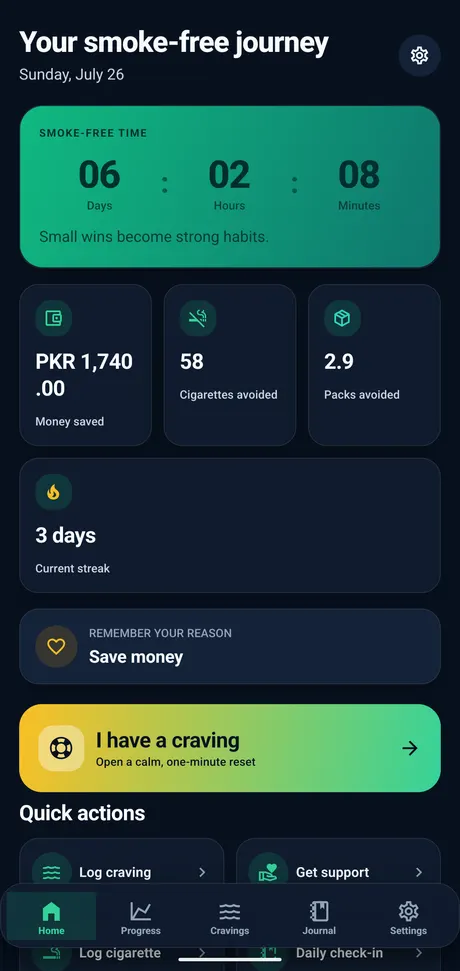
A smoke-free timer shows how long it has been since your quit date, helping you see your progress in days, hours, and minutes.
The timer supports tracking and motivation. It does not promise a particular outcome.
See elapsed days, hours, and minutes from the starting point you choose.
Return to a clear record when seeing your accumulated time feels useful.
Keep personal time markers visible as part of your wider journey record.
Use a past, current, or future quit date based on where you are now.
Set the date that reflects your current plan. You can update it later if your tracking needs change.
Use the current date and time as your starting point.
Enter your original quit date so the timer reflects earlier progress.
Choose a future quit date and prepare your tracking routine beforehand.
These are journey milestones for tracking and reflection, not medical outcome guarantees.
day
days
week
month
year
Free on Android, no account required. Pick your quit date and the timer does the rest.
Clear answers about timer units, quit dates, offline use, milestones, and related progress estimates.
A smoke-free timer shows the time elapsed from the quit date and time you choose, including days, hours, and minutes.
Yes. The timer keeps your elapsed smoke-free time visible in days, hours, and minutes from the start point you choose.
Yes. Set your original quit date and the app can calculate your recorded progress from that point.
Yes. You can set a future quit date and use the time before it to prepare your tracking routine.
Yes. You can update the starting information used by the timer and related estimates.
Yes. Core tracking features are designed to work on your device without an internet connection.
Journey milestones are personal time markers such as one day, one week, or one month. They are not medical outcome guarantees.
Yes. The app estimates money saved using the smoking frequency, cost, and start information you provide.
Choose your quit date and keep elapsed days, hours, minutes, milestones, and related progress visible.
This website and app are not medical advice.

